Cyber-Flaw Affects 745,000 Pacemakers

A total of 745,000 pacemakers have been confirmed as having cyber-security issues that could let them be hacked.
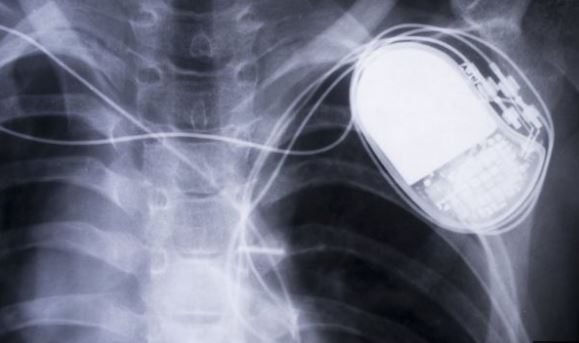
The Food and Drug Administration revealed that 465,000 pacemakers in the US were affected, in an advisory note about a fix to the problem. The pacemaker's manufacturer, Abbott, said there were a further 280,000 devices elsewhere.

The flaws could theoretically be used to cause the devices to pace too quickly or run down their batteries. However, Abbott said it was not aware of any cases of this happening, adding that it would require a "highly complex set of circumstances". The Department of Homeland Security has said that an attacker would need "high skill" to exploit the vulnerabilities.

Three-Minute Fix The affected pacemakers are branded as having been made by St Jude Medical, which was acquired by Abbott earlier this year. Patients are being advised to ask their doctors about an available firmware update at their next scheduled appointment. The pacemakers can receive the revised code by being placed close to a radio wave-emitting wand in a process that lasts about three minutes.

Pacemakers manufactured after 28 August will come with the new firmware pre-installed. "As with any firmware update, there is a very low risk of an update malfunction," the FDA said. The regulator noted a very small number of St Jude devices had lost all functionality after a firmware update in the past. Abbott said some patients might opt to continue with the old firmware as a consequence.

"In some cases, doctors and patients will decide that the risks that could be associated with performing the new pacemaker firmware update for some patients may outweigh the benefits," it said in a note to pacemaker users. "If you do not receive the update, your pacemaker will continue to function as intended, and you can receive the update at any future time."

Legal Battle
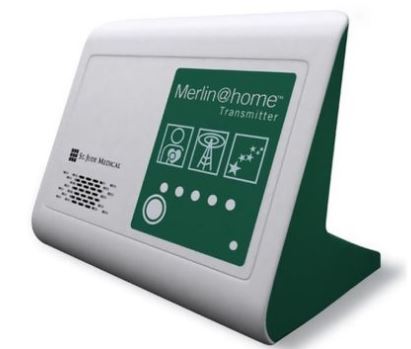
The benefit of allowing the pacemakers to send and receive data wirelessly is that patients can pair them with a transmitter at home that monitors the devices as they sleep and can potentially alert them to medical problems.

A hedge fund, Muddy Waters Research, first warned the media in August 2016that the cardiac equipment had security flaws and claimed they could be exploited by "low-level hackers".

The investment company also revealed it had bet St Jude's shares would drop after it had been told of the issues by security company MedSec. "[St Jude's] apparent lack of device security is egregious, and in our view, likely a product of years of neglect," Muddy Waters said at the time.

St Jude responded by saying it stood behind the security and safety of its equipment and sued its accuser for defamation. However, shortly after Abbott bought St Jude in January, the FDA confirmed there were vulnerabilities in the company's wireless home monitor system, which were subsequently addressed.

Then, in April, the watchdog said Abbott had failed to properly investigate wider cyber-security concerns. Even so, the medical company's legal action against Muddy Waters continues.

Source: BBC

August 2017 CERT Cyber Vulnerabilities

Each month, Nebula Consulting posts vulnerability notes from CERT’s vulnerability database. Check back often for updates! 03 Aug 2017 - VU#824672 - Microsoft Windows automatically executes code specified in shortcut (LNK) files.

Microsoft Windows supports the use of shortcut or LNK files. A LNK file is a reference to a local file. Clicking on a LNK or file has essentially the same outcome as clicking on the file that is specified as the shortcut target. For example, clicking a shortcut to calc.exe will launch calc.exe, and clicking a shortcut to readme.txt will open readme.txtwith the associated application for handling text files.

Microsoft Windows fails to safely obtain icons for shortcut files. When Windows displays Control Panel items, it will initialize each object for the purpose of providing dynamic icon functionality. This means that a Control Panel applet will execute code when the icon is displayed in Windows. Through use of a shortcut file, an attacker can specify a malicious DLL that is to be processed within the context of the Windows Control Panel, which will result in arbitrary code execution. The specified code may reside on a USB drive, local or remote filesystem, a CD-ROM, or other locations. Viewing the location of a shortcut file with Windows Explorer is sufficient to trigger the vulnerability. Other applications that display file icons can be used as an attack vector for this vulnerability as well.

By convincing a user to display a specially-crafted shortcut file, an attacker may be able to execute arbitrary code with the privileges of the user. Depending on the operating system and AutoRun/AutoPlay configuration, this can happen automatically by connecting a USB device.

Solution: Apply an update. This issue is addressed in the Microsoft Update for CVE-2017-8464.


29 Aug 2017 - VU#403768Akeo Consulting Rufus fails to update itself securely

Akeo Consulting Rufus fails to securely check for and retrieve updates, which an allow an authenticated attacker to execute arbitrary code on a vulnerable system.

Akeo Consulting Rufus 2.16 retrieves updates over HTTP. While Rufus does attempt to perform some basic signature checking of downloaded updates, it does not ensure that the update was signed by a trusted certificate authority (CA). This lack of CA checking allows the use of a self-signed certificate. Because of these two weaknesses, an attacker can subvert the update process to achieve arbitrary code execution.

An attacker on the same network as, or who can otherwise affect network traffic from, a Rufus user can cause the Rufus update process to execute arbitrary code.

Solution: This issue is addressed in Rufus 2.17.1187.

5 Best News Apps: Keep Up to Date with the Real Stories

If you need to see a real news feed, here are 5 fantastic news apps to help you get the official story…

Flipboard

Style and substance combine as one of the longest standing news apps improves year on year. Flipboard curates the news you want by watching what you read and offering similar stories. The layout is based on easy to navigate panels giving each user access to their own personal news magazine. With this app, the more you play with it, the more effective it becomes. Aggregating a ton of sources, you can be selective by news type or provider. If it pulls up something you aren’t a fan of, you can ‘less like this’ and the system will learn.

Apple News

iPhone and iPad users will no doubt see the odd news story when they swipe right from the home screen but Apples News app is a decent offering if you take the time to curate what you want to see. You can select the sources you want to accept stories from and then they will filter through to your notification centre. You aren’t restricted to formal news, either. Choose from music news, sport, technology, finance and host of others. The app is typically slick, easy to use and because it's baked into the OS, a no-brainer for Apple fans.

RT News

If you are looking to source some alternative news with a slightly different angle on reporting, then RT is an extremely useful resource. UK-centric news has its own section and world news is easy to find. You can also access their ‘In Vision’ reports for photographic-lead reports and the ‘In Motion’ for a similar video feed. The Viral section is also a nice simple way to see what the world is taking an interest in, as well as checking out some of the more weird and wonderful news of the day. As you would expect from Russia Today, you can keep up with Russian news too.

News Republic

This news aggregator has a slick interface and a host of sources that can be tailored to suit your needs. The menu offers up a simple set of sections to navigate and there is a very useful offline mode you can activate before you commute, should you need to circumvent a loss of connectivity. Other highlights include a video area and the ability to follow sections or individual publishers from each topic. You can also connect with social media for the ability to share what you see.

Simply News

The aptly named Simply News offers an excellent aggregation of news, from all of the major sources. All categorised and collated with some real style. There are a couple of gestures to get the hang of, which will make navigation easier. In look and feel, the development team have clearly taken some cues from long standing news champion, Flipboard. They've added some of their own magic, of course. Customization is the key for real news hounds and Simply doesn't disappoint with a fully loaded settings section, so you can see more of things that will keep you in app.

IoT is About to Tell You When Your Food is Spoiled

Sensors are the core of the Internet of Things

But what if Internet of Things (IoT) sensor technology could tell you whether that lasagna was still safe for dinner or whether it’s time to toss the hair-coloring product slowly drying out in the back of your medicine cabinet? That promise is what’s on the menu at the 254th National Meeting & Exposition of the American Chemical Society (ACS) in Washington, D.C., this week. So, what does the world’s largest scientific society, with more than 157,000 members, have to do with IoT?

Sensor technology is at the core of IoT, and the researchers aligned with the 140-year-old organization have developed a cheap, portable, paper-based sensor that could potentially do a lot more than tell users how old the food is. The idea is that the sensors could actually interact with the substance to tell whether or not it’s spoiled.

Silvana Andreescu, Ph.D., told Phys.org, "My lab has built a versatile sensing platform that incorporates all the needed reagents for detection in a piece of paper. At the same time, it is adaptable to different targets, including food contaminants, antioxidants and free radicals that indicate spoilage."

More than just spoiled leftovers

That means the technology could also be used to identify new medicinal plants without having to bring samples back to the lab, or to authenticate the provenance of expensive wines and teas.

According to Andreescu, the key is nanostructures that “catch and bind” with the compounds being tested for — in this case, the reactive oxygen species that products accumulate as they age and eventually spoil — changing color to indicate the results. Green for good to eat, for example, or red for send it to the dumpster.

Even better, because all the reagents needed are incorporated into the paper, “users don't need to add anything other than the sample being tested.” That means the sensors could be added to food or cosmetic labels, offering real-time information on the condition of their contents without users having to perform special tests.

Super cheap, disposable sensors could be big business

So, yeah, that lasagna may not be getting any younger, but deciding whether to keep or toss it may no longer be a guessing game. And that could help take a bite out of the $640 worth of food the average American family throws out each year, according to the American Chemistry Council. Put it all together, and those leftovers add up to big dollars — an estimated $165 billion worth of food Americans waste every year.

Sure, these paper-based, color-coded sensors don’t need the internet to display their results, but these kinds of super-cheap, disposable sensors can only extend the reach of the IoT. And it’s hardly a stretch to see these sensors being able to communicate with smart appliances to track how well they’re doing preserving food, notifying consumers when stuff needs to be thrown out, and even figuring out when staples need to be replaced.

For more info, check out this YouTube video: https://youtu.be/4ODMk5qjGus


Your Cell Phone Is 10 Times Dirtier Than a Toilet Seat. Here's How to Clean it.

Most people don’t give a second thought to using their cell phone everywhere, from their morning commute to the dinner table to the doctor’s office. But research shows that cell phones are far dirtier than most people think, and the more germs they collect, the more germs you touch.

In fact, your own hand is the biggest culprit when it comes to putting filth on your phone. Americans check their phones about 47 times per day, according to a survey by Deloitte, which affords plenty of opportunities for microorganisms to move from your fingers to your phone.

“Because people are always carrying their cell phones even in situations where they would normally wash their hands before doing anything, cell phones do tend to get pretty gross,” says Emily Martin, assistant professor of epidemiology at the University of Michigan School of Public Health. Research has varied on just how many germs are crawling on the average cell phone, but a recent study found more than 17,000 bacterial gene copies on the phones of high school students. Scientists at the University of Arizona have found that cell phones carry 10 times more bacteria than most toilet seats.

Human skin is naturally covered in microbes that don’t usually have any negative health consequences, and that natural bacteria, plus the oils on your hands, get passed on to your phone every time you check a text or send an email. It follows that m ost of the organisms found on phones are not pathogens that will make you sick, Martin says. Staphylococcus might be present, for example, but it’s not typically the kind that will give you a staph infection.

But some bacteria should concern you. “We’re not walking through a sterile environment, so if you touch a surface there could be something on that," says Susan Whittier, director of clinical microbiology at New York-Presbyterian and Columbia University Medical Center. "There are lots of environmental contaminants."

Studies have found serious pathogens on cell phones, including Streptococcus, MRSA and even E. coli. Just having these microbes on your phone won’t automatically make you sick, Whittier says, but you still don't want to let them enter your system. Viruses can also spread on phones if one person is sick with strep throat or influenza and coughs on their cell phone before handing it off to a friend.

Fortunately, there are easy ways to avoid some germs. One of the worst places to use your phone is in the bathroom, Martin and Whittier both agree. When toilets flush, they spread germs everywhere, which is how phones end up with fecal bacteria like E. coli. “Taking a cell phone into the bathroom and then leaving with it is kind of like going in, not washing your hands and then coming back out," Martin says. "It’s the same level of concern."

Keeping your phone out of the bathroom will help, but if you want to clean your phone, a few different methods will work. Many people just wipe their phones with a soft microfiber cloth, which will remove many of the germs. For a deeper clean, Whittier recommends using a combination of 60% water and 40% rubbing alcohol. Mix the ingredients together, and then dip a cloth in the solution before wiping it gently across your phone. Unless you’re sick, doing this a few times each month is plenty, Whittier says. Stay away from liquid or spray cleaners, which can damage your phone.

Still, the best advice has more to do with you than the phone. Wash your hands several times a day, the experts say, and you’ll likely be just fine.

Source: Time.com