Cybersecurity Best Practices for Small Businesses

The impact of the Equifax data breach that compromised the personal data of over 145 million individuals has left many confused, frustrated and downright angry. And while massive attacks on large corporations make headlines, small businesses have just as much, if not more, at stake. According to data analyzed in a report by Hiscox, an insurance provider, cyberattacks are likely to have a bigger financial impact on small businesses. The 2017 report found that small businesses with under 99 employees faced an average cost of $36,000 after a cyberattack. Less advanced security protection, a smaller budget dedicated to cybersecurity and fewer resources for a fleshed-out IT department make small businesses an ideal target for hackers.

What is a Cyberattack?

A cyberattack is an unauthorized attempt to expose, destroy or access your data. According to a survey of 700 business owners by BuyBizSell, an online marketplace for small businesses up for sale, 1 in 10 small businesses have been attacked. The three most common attacks cited were general malware, web-based attacks, and phishing scams or social engineering.

General malware. Short for malicious software, malware acts against the intent of the user, and can come in the form of a virus, Trojan horse or worm. Ransomware — a form of malware that demands money to avoid a negative consequence, like permanently deleting your data or publishing it publicly — costs small businesses approximately $75 billion a year, according to a 2016 report by cybersecurity company Datto.

Web-based attacks. A web-based attack is when malware gets access to your computer via the internet. There are multiple ways for this to happen, including malicious websites that present themselves as legitimate, and hackers who insert malicious code into the code of a legitimate website.

Social engineering scams. A social engineering attack is when a hacker tricks you into giving up personal information like credit card numbers, Social Security numbers or bank information. It is also known as phishing.

How can I protect myself and my customers?

EDUCATE YOURSELF

For October, which is National Cyber Security Awareness Month, Microsoft is offering a series of free cybersecurity workshops for small-business owners, co-sponsored by the National Institute of Standards and Technology, or NIST, and the U.S. Small Business Administration. The SBA also offers a self-guided online course in cybersecurity basics.

CREATE A CYBERSECURITY PLAN

Your cybersecurity plan should include an employee training program and incident response plan. The first step to securing your network is to make sure your employees understand security policies and procedures. Training shouldn’t be a one-and-done deal; schedule yearly or semi-yearly refresher courses to keep security top of mind. Help your employees understand the importance of updating their software, adopting security best practices and knowing what to do if they identify a possible security breach.

The faster you act in the face of a cyberattack, the better you’ll be able to mitigate the damage.

An incident response plan will have crucial information such as:

  • whom to contact
  • where data and data backups are stored
  • when to contact law enforcement or the public about a breach

The Federal Communications Commission offers a cybersecurity planning guide to help small-business owners create a plan to protect their business. (You can download your customized plan at the bottom of the page after you create it.)

BE SMART ABOUT PASSWORDS

The NIST advises government agencies on password best practices. According to the organization’s Digital Identity Guidelines, released in June 2017, NIST recommends passwords be at least eight characters long and notes that length is more beneficial than complexity. Allow your employees to create long, unique passwords that are easy for them to remember.

If you deal with highly sensitive data, you may want to require multifactor authentication, which requires users to present at least two identifying factors, like a password and a code, before gaining access to systems or programs. Think of it like an ATM, which requires a combination of a bank card and a PIN to access funds.

INCREASE YOUR EMAIL SECURITY

According to cybersecurity company Symantec, in 2016, 1 in 131 email messages were malicious — this is the highest rate in five years.

Basic email safety precautions, like not opening suspicious attachments or links, are a first step that can be covered in your employee training plan. If you deal with clients’ personal data, you can also encrypt documents so both the sender and the recipient need a passcode to open it.

USE A FIREWALL AND ANTIVIRUS SOFTWARE

A firewall acts as a digital shield, preventing malicious software or traffic from reaching your network. There are many kinds of firewalls, but they fall into two broad categories: hardware or software.

Some firewalls also have virus-scanning capabilities. If yours doesn’t, be sure to also install antivirus software that scans your computer to identify and remove any malware that has made it through your firewall. It can help you control a data breach more efficiently by alerting you to an issue, instead of your having to search for the problem after something goes wrong.

SECURE YOUR WI-FI NETWORK

Any type of Wi-Fi equipment you receive will not be secure when you first buy it. And no, you shouldn’t keep the default password that comes with your device — there are resources online for hackers to access default passwords based on model numbers of popular routers, so make sure your network is encrypted with your own, unique password. Your router will likely allow you to choose from multiple kinds of passwords; one of the most secure is a Wi-Fi Protected Access II (WPA2) code.

You’ll also want to hide your network, meaning the router does not broadcast the network name. If customers or clients will need access to Wi-Fi, you can set up a “guest” account that has a different password and security measures, which prevents them from having access to your main network.

PROTECT YOUR PAYMENT PROCESSORS

It’s crucial to work with your bank or payment processor to ensure that you’ve installed any and all software updates. The more complex your payment system, the harder it will be to secure, but the Payment Card Industry Security Standards Council offers a guide to help you identify the system you use and how to protect it.
The Equifax Hack is Way Worse than Consumers Knew

The Equifax data breach exposed more of consumers’ personal information than the company first disclosed last year, according to documents given to lawmakers.

The credit reporting company announced in September that the personal information of 145.5 million consumers had been compromised in a data breach. It originally said that the information accessed included names, Social Security numbers, birth dates, addresses and – in some cases – driver’s license numbers and credit card numbers. It also said some consumers’ credit card numbers were among the information exposed, as well as the personal information from thousands of dispute documents.

However, Atlanta-based Equifax Inc. recently disclosed in a document submitted to the Senate Banking Committee, that a forensic investigation found criminals accessed other information from company records. According to the document, provided to The Associated Press by Sen. Elizabeth Warren’s office, that included tax identification numbers, email addresses and phone numbers. Finer details, such as the expiration dates for credit cards or issuing states for driver’s licenses, were also included in the list.

Equifax’s disclosure, which it has not made directly to consumers, underscores the depth of detail the company keeps on individuals that it may have put at risk. And it adds to the string of missteps the company has made in recovering from the security debacle.

Equifax spokeswoman Meredith Griffanti said that “in no way did we intend to mislead consumers.” The company last year disclosed only the information that affected the greatest number of consumers and wanted to “act with the greatest clarity” in terms of the information provided the committee, she said.

Griffanti also said that while the list provided to the committee includes all the potential data points that may have been accessed by criminals, those elements impacted a minimal portion of consumers. And some data — like passport numbers — were not stolen. The company reiterated that the total number of consumers affected is unchanged.

Equifax waited months to disclose the hack. After it did, anxious consumers experienced jammed phone lines and uninformed company representatives. An Equifax website set up to help people determine their exposure was described as sketchy by security experts and provided inconsistent and unhelpful information to many. The company blamed the online customer help page’s problems on a vendor’s software code after it appeared that it had been hacked as well.

Watch The Winter Olympics: Live Stream Every Sport Online From Anywhere

This is the best way to watch the Winter Olympics 2018 online - from absolutely anywhere in the world - without any commercial breaks:

 1. Download and install a VPN If you don't have easy access (and you don't live in the UK or the US) to watch the Winter Olympics online in your country, the best way to watch it for free is to download and install a VPN. We've tested all of the major VPN services and we rate ExpressVPN as the absolute best. It's compatible with all of your devices, supports most streaming services and ranks amongst the fastest. You can even install it on devices like an Amazon Fire TV Stick, Apple TV, Xbox and PlayStation. So for a one-stop shop, you can't go wrong with Express - but there are more fantastic VPN options out there as well:

 The best 3 VPNs for streaming sport online: 1. ExpressVPN:  the best all-round VPN for streaming, comes with 30-day trial 2. NordVPN: SmartPlay tech makes NordVPN a great choice for streaming 3. VyprVPN: blazing speeds make VyprVPN a great choice for 4K video

2. Connect to the appropriate server location Simply open the VPN app, hit 'choose location' and select the appropriate location - it doesn't matter which one and it's super easy to do.

Choose UK if you want to watch it on TVPlayer (use the link below)

Choose US if you want to watch the Winter Olympics 2018 via Youtube TV (use link below)

3a. Go to TVPlayer.com TVPlayer is a free, legal, online streaming service based in the UK which offers hundreds of channels - and you don't even need to sign in to get some Olympics coverage without commercial break. You will need to do a fair bit of channel hopping though and a lot of the events won't be available on free channels. Continue scrolling if you want to experience a fuller and richer version of the Winter Olympics.

3b. Go to TV.youtube.com Many online US-based TV streaming services offer NBC Sports as part of their bundles and a few of them offer trials and the best one is YoutubeTV, an official Google product. You can trial it for 30 days; the ability to record to the cloud and hold up to six accounts per household (and 3 simultaneous streams per membership) are its most alluring selling points. You can watch it on most devices and there are no fees for canceling.

However, you will need a US IP address in order to access all of the above and if you are outside the US, you will need to get an IP address located there by using a VPN.

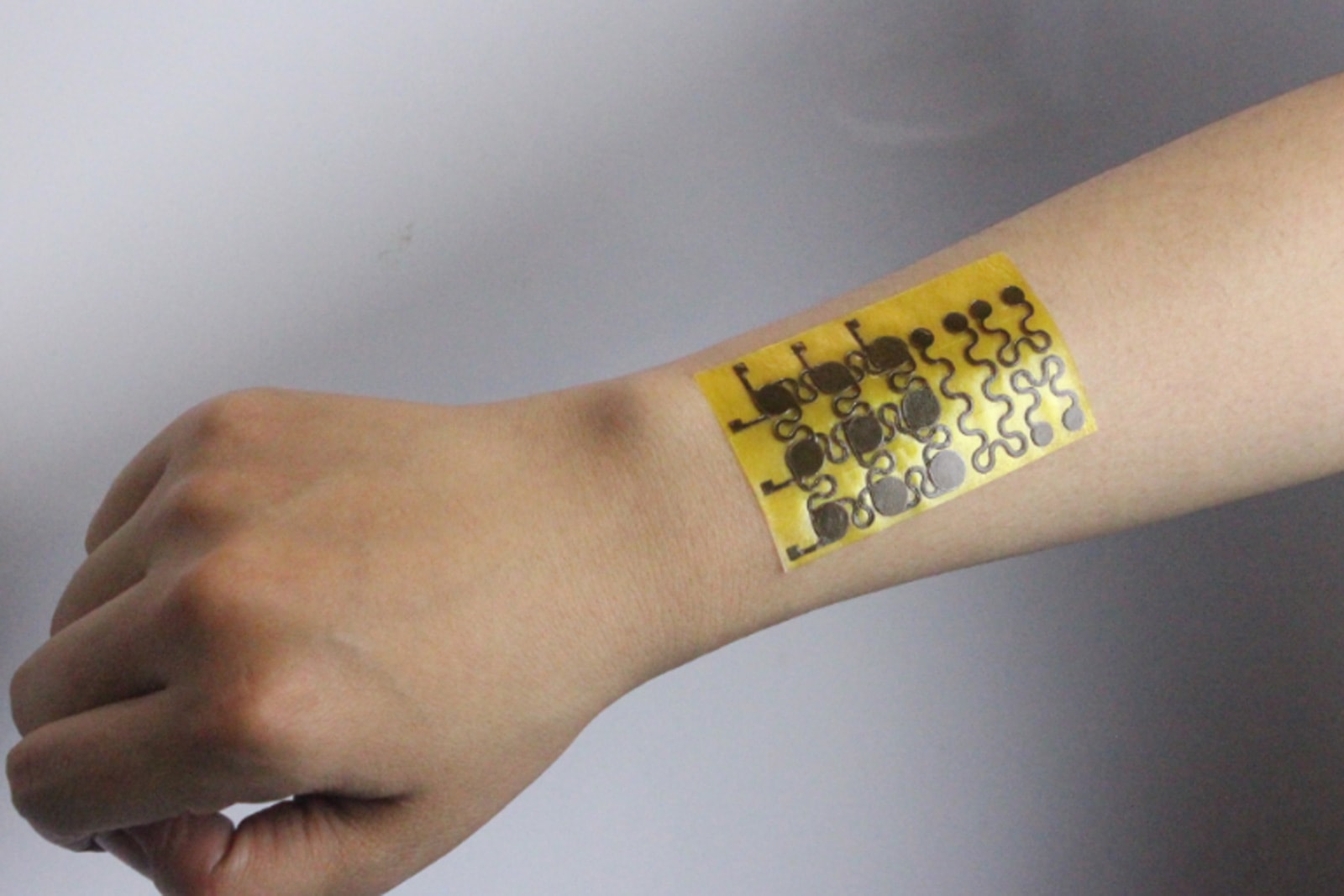
Rugged E-Skin Can Heal Its Cuts and Scrapes

Scientists dream of prosthetics and robots with electronic skin that can convey heat and pressure just like the real thing, but there's a big problem getting in the way: the outside world. Bumps and scrapes can damage these sensors, and it's not really practical to toss these skins in the trash when they're no longer useful. UC Boulder researchers hope to fix that. They've developed an e-skin that can communicate temperature and pressure, but is both self-healing and fully recyclable. You could take a cut on a synthetic arm without panicking, and reuse any damaged 'tissue' to make replacements.

The trick is the use of a unique polymer (polyimine) laced with silver nanoparticles. It can still conduct electricity and withstand stress, but its covalent atomic bonds make it both self-healing and recyclable at room temperatures. It just has to use widely available ethanol compounds to patch itself up, and you can degrade the polymers using a recycling solution that separates the silver from the skin in question.

Any practical uses are a long way off, but they're definitely on the horizon. You can easily use a modest amount of heat and pressure to make the skin wrap around curved surfaces, so it's ideal for smart prosthetics or advanced robots that may need both ruggedness and a delicate grip. All told, e-skin is becoming more of a practical reality outside of the lab.

Cybersecurity Breaches: How to Tell if You’ve Been Hit and How to Fix It

2017 was not a good year for cybesecurity. Though, depending on how you look at it, it was a good year for cybersecurity awareness. There was a major breach or announcement nearly every month of the year. The previous few years weren’t much better. With so many businesses – even ones large enough to hire their own information security teams – being victimized by hackers, it should be blatantly obvious to everyone that cybersecurity across the board could do with an upgrade. The biggest problem is that security breaches can go undetected for years, especially if you’re not monitoring properly. And the longer it remains open, the higher the cost of a breach. Worst of all, notifying affected users too long after the fact can result in a damaged reputation and public backlash.

That’s why we’ve put together a brief guide to identifying breaches and some tips for how to respond if you’ve found one. Even without a background in technology, by the time you’re done reading this, you should be savvy enough to recognize red flags and take action.

How Hackers Strike

Hackers and malicious users implement a variety of tactics to exploit your systems. A number of them are highly technical, and unless you have a firm understanding of computer systems, you won’t be properly equipped to deploy a countermeasure. That’s why it’s important to have experts you can count on (either external or internal to the company) to defend your systems.

That said, cybersecurity has grown by leaps and bounds, and it’s not as easy to hack a system as it used to be. Plus, not every malicious user knows how to do it. So, many hackers opt for a different tactic: social engineering (sometimes jokingly referred to as “wetware hacking”). By manipulating people, hackers can get access even when more direct intrusions aren’t possible.

Signs You’ve Been Compromised

While it won’t be obvious if you’ve had a security breach, there will be certain symptoms. To the unobservant, they will seem like a minor annoyance, but if you notice these symptoms, it’s time to have your IT team do some digging.

A Snail’s Pace

If you find that your computer or your internet browser is suddenly running more slowly than normal, even after updating and restarting, then that may be a sign there is malware running on your computer. Malware, like a parasite, leeches processing power from your computer to do its job, and your first clue is this slowdown effect.

The Ominous Annoyance

Pop-ups, intrusive ads and website redirects happen from time to time, but they’re not omnipresent. At least, not normally. If you find that, even with ad blockers, you’re being inundated by annoying advertisements, it’s likely you’ve either been compromised already or someone’s trying really hard to get you to click on one of the links and download some malware.

All Locked Up

We all forget or mistype our password from time to time, and that can occasionally result in a lockout. But if you find you’re locked out even on the first try, that’s a cause for concern. It’s possible someone else is trying to (unsuccessfully) log into your profile, or they’re already in and have changed the password.

Space Invader

Most employees at a company who use a computer are given some personal space to work. Keep an eye on this space, including what’s going on inside the computer, for anything suspicious. If things are moved or changed on your desk, if your chair has been messed with, if files or settings on your computer have been moved, deleted or tampered with, or even if the computer is left on when you swore you turned it off, it’s time to look a little closer. Your company may have been breached internally.

How to Respond to a Breach

If you do detect that you’ve been breached, shoring up security should be your highest priority. Aside from closing the vulnerability, you need to do some digging and learn four things:

  • How were you breached?
  • When did it happen?
  • What was taken/damaged?
  • Who was affected?

Once you have this information, you’ll want to immediately notify anyone who was affected. Moreover, depending on your location and the size of the breach, you may need to notify the public, news, and/or government agencies where applicable (laws vary by state). Don’t stop there, though. The more proactive you get, the more effective you’ll be at cyber safety and mitigating damage, and the faster you’ll get the business back on its feet.

While incursions are impossible to avoid altogether, with a little vigilance and a little help, you can dodge most of the bullets and recover much more quickly if you get hit.