
5 Privacy Protecting Apps You Need to Use Right Now

On the internet, you can never be too safe. New threats keep coming up all the time, whether attacking your security or trying to mine your data. It only makes sense to do whatever you can to stay secure. And just as the internet takes, the internet also provides. Developers have made everything from extensions that will stop data-miners to simple apps that monitor how secure you are. Here are five of the best that you should use right away.

1. Two Factor Auth (Web): Lock Your Accounts Twice!

Two-factor authentication (2FA) is fast gaining popularity as a must-have security measure for any digital account.

Two Factor Auth has every single website that supports or doesn’t support 2FA, and which type of 2FA is available. For example, your secondary token can be hardware or software related, and differ in how you receive it: email, phone call, or SMS.

Two Factor Auth Web App

There are some services you should lock down with 2FA right away, but make this site your weekend project. In case the worst happens, you’ll feel mighty thankful.

2. IOT Scanner (Web): Are Your Devices “Open” on the internet?

The “internet of Things” (IoT) promises to change how we live our lives. But it’s also fraught with risk. When you have things like your fridge or your smart TV always connected to the internet, that also leaves them open to hackers. In fact, IoT is a potential security nightmare.

IoT Scanner is a simple tool that figures out which of your devices is open publicly. It checks the IP devices of all the gadgets in your home network, and sees if they are available openly on Shodan. Shodan is a database of publicly-accessible devices on the internet.

Internet of Things Scanner

After you click the “Check if I am on Shodan” button, it’s a good idea to also do the Deep Scan. That’s the one which you want to know about, and ideally, you’re looking for the green tick at the end of it.

3. Deseat.me (Web): Scan Gmail, Find Everything You Signed Up For

Over the years, you’ve probably used your Gmail account to sign up for several services. Whether you used the power of Gmail aliases or not, you might have forgotten which places you have an account at. And if you used the same password and one of those gets hacked, suddenly, you’re in grave danger.

Deseat Me Web App

Deseat.me scans your Gmail inbox to find everything you have subscribed for over the years. It reads your emails, yes, but your privacy is guaranteed by working entirely offline. The app does not send any data to its servers. So run it once, let it find everywhere you have registered, and then start visiting those sites to delete the accounts you no longer use.

4. Privacy Badger 2.0 (Chrome, Firefox): The EFF’s Privacy Protecting Extension

Websites are always tracking you. On any page you go, even something as small as Facebook and Twitter’s social sharing buttons are tracking you. All of this information is used to build a “profile” of you, sold to advertisers. Want to stop that? Privacy Badger is what you need.

Privacy Badger Logo

Privacy Badger is made by the Electronic Frontier Foundation, a non-profit independent group protecting consumers on the internet. Privacy Badger works faster than before and adds more protection. Specifically, it tackles the problem of websites and malware trying to find your IP address, which can lead to more harm later.

Privacy Badger is completely free. The EFF recommends also enabling Do Not Track, but we found that Do Not Track doesn’t do much.

5. Passlock (Web, Chrome, Android, iOS): Easy Email Encryption for Everyone

You already know that sending sensitive data on emails is risky. You never know who might be snooping. The ideal solution is to encrypt your emails, but it’s a messy process. Passlock makes it simple.

https://youtu.be/UxgrES_CGcg

In a nutshell, Passlock is a client for the Pretty Good Privacy (PGP) standard. The app creates a “lock” and a “key” for you. You can send your lock to others. Others can apply your lock to any email they want to send you. This way, since only you have the key, only you’ll be able to open the lock and read the email. Even if someone else intercepts the email, they can’t open it since they don’t have the key.

Passlock works on smartphones as well as with email, including Gmail. It’s extremely easy to use, and it is built by a security professor to boot.
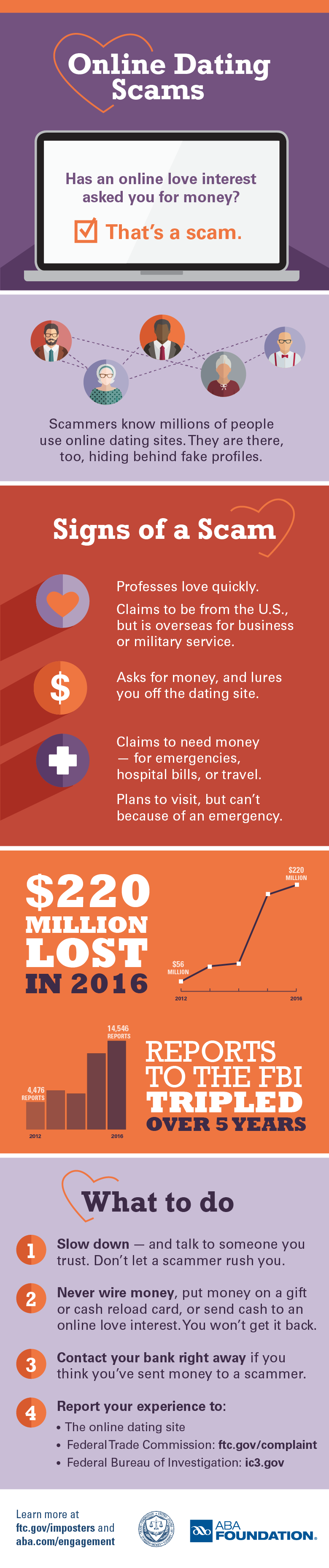

Top Scams of 2017

Unfortunately, identity theft and fraud also have a top ten list, as the following scams demonstrate. This list includes some of the most prevalent scams of 2017, some of the most damaging, and quite frankly, some of the most bizarre. 1. Can You Hear Me? Scam

When news of this scam began to circulate, it almost seemed like a hoax. However, law enforcement agencies all over the country issued warnings after victim reports began to roll in. A caller, presumably fumbling with a headset mic or worried about a bad connection, would ask a simple question—“Can you hear me?”—and record the victim saying, “Yes.” That simple answer led to expensive charges and subscriptions for the victim after their responses were spliced onto a different recorded question.

2. Bank Text Scams

Victims all across the country reported receiving text messages from Wells Fargo, Bank of America, Chase, and other high-profile financial institutions, warning them that something was wrong with their accounts. These “smishing” scams called for recipients to click the included link, which led to installing a virus on the mobile device or taking the victim to a screen to submit all of their highly sensitive personal information to the scammer.

3. Health Insurance Scams

Following the start of a new presidential administration, there was a lot of news circulating about “repealing and replacing” the government healthcare program. That led to scam attempts that offered to secure your health insurance coverage for another year, offers of a new government program, and more, all of which were fake.

4. Student Loan Relief Scams

Again, with the changeover in presidential administrations, scammers also sought out victims by threatening them with the loss of other existing government programs, this one specifically for student loan forgiveness. Any scam that can entice victims to “act now or lose out” can cause even the most sensible people to make a rash decision.

5. Reshipping Scams

This category of scams not only can cause its victims to lose money or personal information, it can also land them in jail. Reshipping scams can involve trafficking in stolen goods or accepting illegal payments then sending that money on to another scammer. Either way, the victim in the middle is just as guilty of a crime as the mastermind behind it. One US citizen in Louisiana has just been indicted on more than 200 counts of wire fraud for serving as the go-between in a Nigerian prince email scam.

6. Nigerian Prince Scams

Speaking of Nigerian princes…those scams aren’t going away anytime soon. What has changed, though, are the tone and the tactics. One version went rampant this year: the death threat. The bone-chilling email says someone has hired the sender to kill you, but he’s been following you and you “seem like a good person.” For the amount of money requested, he will happily not harm you.

7. Social Media Scams

This year saw not only social media scams, but also more variety in the platforms that were used. Facebook hoaxes and gift card scams are nothing new, but they’ve filtered over to other platforms like Instagram and WhatsApp. These typically entice you to click, like, or share in order to earn a gift card or be entered in a drawing. Unfortunately, you’re only increasing their visibility online when you play along, and you’re potentially sharing your sensitive information with scammers.

8. Jury Duty Scams

One commonly reported police warrant fraud this year was the jury duty scam. The victim is informed that they failed to appear for jury duty—because they were never summoned in the first place—and now they must pay a hefty fine for being in contempt of court. That all sounds very plausible, right up until the scammer orders you to pay via prepaid debit card, iTunes gift card, or some other untraceable method.

9. Federal Grant Scams

These scams work because we’ve probably heard about wasteful spending or unclaimed budget line items. This scam informs you that you’re eligible for some type of government money, whether it’s to go back to school, pay off your mortgage, start a business, even to lose weight. Clicking the link will possibly install harmful software on your computer, and you’ll be asked to fill out highly-sensitive forms that scammers will use to steal your identity.

10. Travel Scams

There is a growing world of app-based travel that involves third-parties. Companies like Uber and AirBnb don’t actually own any of the vehicles or properties, but you can take advantage of the low cost associated with using another individual’s car or house. While these are absolutely legitimate companies that offer tremendous savings and convenience, there are also plenty of scammers who’ve slipped through the cracks. They sign up to be a driver or host an accommodation, only you’re trapped by the bait and switch.

Of course, this list is only skimming the surface of the types of identity information-based crimes that occur each and every day. The most important thing consumers can do is to remain aware and vigilant about the threat; exercising an air of caution can help you pause and think through the ramifications before clicking on that message.

New Cryptocurrency-Mining Android Malware is Spreading Rapidly

android-cryptocurrency-malware

Due to the recent surge in cryptocurrency prices, threat actors are increasingly targeting every platform, including IoT, Android, and Windows, with malware that leverages the CPU power of victims' devices to mine cryptocurrency.

Just last month, Kaspersky researchers spotted fake antivirus and porn Android apps infected with malware that mines Monero cryptocurrency, launches DDoS attacks, and performs several other malicious tasks, causing the phone's battery to bulge out of its cover.

Now, security researchers at Chinese IT security firm Qihoo 360 Netlab discovered a new piece of wormable Android malware, dubbed ADB.Miner, that scans wide-range of IP addresses to find vulnerable devices and infect them to mine digital cryptocurrency.

According to the researchers, ADB.Miner is the first Android worm to reuse the scanning code programmed in Mirai—the infamous IoT botnet malware that knocked major Internet companies offline last year by launching massive DDoS attacks against Dyndns.

ADB.Miner scans for Android devices—including smartphones, smart TVs, and TV set-top boxes—with publicly accessible ADB debug interface running over port 5555 and then infects them with a malware that mines Monero cryptocurrency for its operators.

Android Debug Bridge (ADB) is a command-line tool that helps developers debug Android code on the emulator and grants access to some of the operating system’s most sensitive features.

It should be noted that almost all Android devices by default come with the ADB port disabled, so botnet would target only those devices that have manually been configured to enable port 5555.

Besides mining Monero cryptocurrency, ADB.Miner installed on an infected device also attempts to propagate itself by scanning for more targets on the Internet.

Researchers did not reveal exactly how or by exploiting which ADB flaw hackers are installing malware onto Android devices.

However, the researchers believed hackers are not exploiting any vulnerability that targets any specific device vendor since they found devices from a wide range of manufacturers impacted.

According to the researchers, the infection started on January 21, and the number of attacks has increased recently. As of Sunday, the researchers detected 7,400 unique IP addresses using the Monero mining code—that's more than 5,000 impacted devices in just 24 hours.

Based on the scanning IP addresses, the highest number of infection has been noticed in China (40%) and South Korea (31%), the researchers estimated.

In order to fight against such malware Android users are advised not to install unnecessary and untrusted applications from the app store, even from Google Play Store, and keep your devices behind a firewall or a VPN.

3 Biggest Cybersecurity Threats Facing Small Businesses Right Now

Technology has quickly engulfed the world around us. Everything we do, both at a business and personal level, seems to involve technology in one way or another. However, as that happens, small businesses continue to be a top target for hackers, with the number of organizations hit by cybercrime rising each year. According to The Ponemon Institute’s 2017 State of Cybersecurity in Small & Medium-Sized Businesses report, 61 percent of businesses experienced a cyber attack in 2017, signifying a 6 percent increase from the previous year’s 55 percent. Data breaches were up to 54 percent from 50 percent in 2016. This year promises faster internet, more connectivity, and unfortunately, more cybersecurity threats. Threat Horizon 2018, from the Threat Horizon series by the non-profit association Information Security Forum (ISF), shows that with the growing connectivity, there will be an increase in the information security threat landscape.

1. Internet of Things (IoT) leaks

As real-time data collection becomes increasingly important, the IoT is growing too. From monitoring traffic and collecting real-time patient information to optimizing the uptime of industrial equipment, organizations are massively acquiring IoT devices. However, these devices aren’t always secure. This creates a potential backdoor into the organization, warns the ISF.

IoT works so great because it’s comprised of dozens of devices that hide in plain sight. Be it alarm systems, GPS, web cameras, HVAC or medical devices, such as pacemakers, it’d be hard to guess which of these devices are even connected to the internet in the first place. But since IoT devices lack built-in security, they are often easy targets by hackers.

 Attackers usually use automated programs to locate IoT devices. Once located, attackers attempt to connect to the device using the default admin credentials. And since most users don’t change them, this is usually a success for the attacker. Once in, the hackers can easily install malware, basically taking the system under their control.

Daniel Soderberg, CEO of EyeOnPass, advises changing all passwords immediately when you acquire a new device. “I wouldn’t operate any device with the default password,” he warns. “Default passwords are usually printed and freely available, exposing the user to all manner of cyber dangers.”

2. Opaque algorithms                                                                                              

The Threat Horizon 2018 report also warns of the increasing using of algorithms. As organizations continue to fully trust algorithms with the operation and decisions concerning critical systems, the report says, they lose the visibility into the functioning and interaction of their systems.

The lack of proper and transparent interactions between algorithms poses a security risk in case unintended interactions between algorithms create incidents -- like the U.S. Treasury Bonds “flash crash” of October 2014 that saw bond yields drastically drop briefly before the algorithms corrected themselves.

“We know they’re going to do some quirky stuff from time-to-time,” says Steve Durbin, managing director of the ISF. “You need to understand some of the exposure you have to algorithmic systems. We’re building more and more of our systems on top of algorithms -- industrial control, critical infrastructure. There’s an increasing risk in this space we need to be addressing.”

To be able to manage these risks, organizations need to have a human monitoring the execution of operations and decisions often left to algorithms. The report advises organizations to know the risks that come with algorithm-controlled systems and know when to involve a human. Also, they must update their code maintenance policies and identify alternatives to treating algorithm-related incidents, especially when insurance isn’t an option.

3. Security researchers are being silenced

Security researchers are often the whistleblowers. They impart knowledge about digital vulnerabilities, making sure systems are secure and users’ data remains in the intended hands. When they are silenced, either by the government or private companies, it’s often a loss for all users.

With software replacing hardware in most major sectors, users and businesses depend on researchers to unearth vulnerabilities and make them public as part of ongoing efforts to improve security. However, lately, manufacturers have been responding to such actions by taking legal action instead of working with the research to fix those vulnerabilities. The ISF predicts that this trend will only grow; exposing customers to vulnerabilities that manufacturers have decided to hide rather than fix.

To protect themselves, the ISF advises technology buyers, which include small businesses, to insist on transparency during the procurement process. It advises manufacturers to take it more positively when vulnerabilities are found within their systems by rewarding the researchers rather than attempting to punish them.

Considering that a researcher might find a vulnerability in a tool in 2018 and not report it, it’s imperative for the small business owner to take a step further in protecting themselves, even if it means working with other business in order to come up with an affordable solution.

Transparency is key

When it comes to security, transparency has a great role to play. But this part has long been left for the security professionals. If all users reflected some degree of transparency, security in the cyberspace would be easier to achieve. If the non-technical managers and leaders understood the impact of good and poor protection, they would use the cyber assets they have more responsibly. Employees would be more careful about the devices they introduce to the network.

As the business owner, it’s your job to carefully manage the inventory of the connected IoT devices. “Some things have internet capabilities that you didn’t ask for and will never use,” says Leon Adato of SolarWinds adding that any devices that don’t need to be connected to the internet should be disconnected.