Critical Oracle Micros POS Flaw Affects Over 300,000 Payment Systems

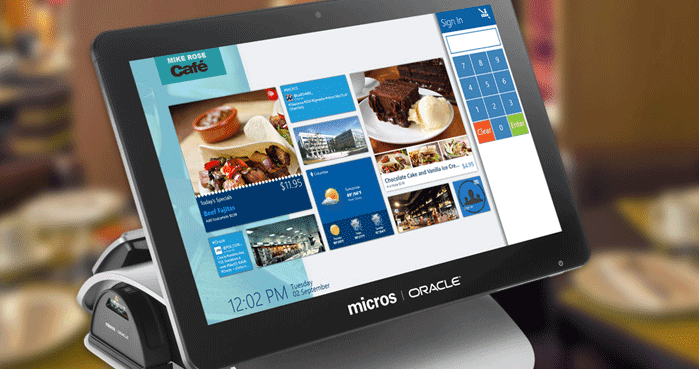
Oracle has released a security patch update to address a critical remotely exploitable vulnerability that affects its MICROS point-of-sale (POS) business solutions for the hospitality industry.

The fix has been released as part of Oracle's January 2018 update that patches a total of 238 security vulnerabilities in its various products.

According to public disclosure by ERPScan, the security firm which discovered and reported this issue to the company, Oracle's MICROS EGateway Application Service, deployed by over 300,000 small retailers and business worldwide, is vulnerable to directory traversal attack.

If exploited, the vulnerability (CVE-2018-2636) could allow attackers to read sensitive data and receive information about various services from vulnerable MICROS workstations without any authentication.

Using directory traversal flaw, an unauthorized insider with access to the vulnerable application could read sensitive files from the MICROS workstation, including service logs and configuration files.

As explained by the researchers, two such sensitive files stored within the application storage—SimphonyInstall.xml or Dbconfix.xml—contain usernames and encrypted passwords for connecting to the database.

"So, the attacker can snatch DB usernames and password hashes, brute them and gain full access to the DB with all business data. There are several ways of its exploitation, leading to the whole MICROS system compromise," the researchers warned.

"If you believe that gaining access to POS URL is a snap, bear in mind that hackers can find digital scales or other devices that use RJ45, connect it to Raspberry PI, and scan the internal network. That is where they easily discover a POS system. Remember this fact when you pop into a store."

ERPScan has also released a proof-of-concept Python-based exploit, which, if executed on a vulnerable MICROS server, would send a malicious request to get the content of sensitive files in response.

Besides this, Oracle's January 2018 patch update also provides fixes for Spectre and Meltdown Intel processor vulnerabilities affecting certain Oracle products.

How to Keep Your Company Data Safe From Hackers

It was recently revealed that more than 43 percent of cyberattacks are targeted at small businesses – up from just 18 percent in 2011. This is likely to be because compared to their larger counterparts, startups and small companies lack the internal expertise and budgets to invest heavily in expensive cyber defenses. But cybersecurity has gone from being a luxury to something that no organization can afford to do without. Figures released by the Ponemon Institute revealed that the average cost of a data breach in the U.S. is more than $7 million. And the EU is bringing in new legislation that states that any company that that holds the data of EU citizens must commit to far more stringent data protection regulations or face fines of up to €4 million.

Clearly, then, from a financial perspective alone it has never been more important for businesses to invest in cybersecurity and defences for their digital systems. Here we take a look at some of the ways that small businesses can keep their crucial company data safe from cybercriminals and hackers.

Educate Your Staff and Colleagues

It is important to understand that the most crucial line of defence against hackers is not a firewall or an external cybersecurity team but your own staff. Unfortunately, it is the case that some of the most effective forms of cybercrime are facilitated by accidental or careless actions by employees. For example, one of the most common hacking techniques is a phishing email which purports to be a genuine email to get an employee to reveal login credentials for your computer system.

This means it is vital for you to provide training to staff and colleagues on common hacking and cybercrime techniques and how they can avoid being caught out.

Encrypt

Stolen customer data can be a nightmare for a business, not to mention for the individuals whose data has been taken. And while it may not always be possible to stop sophisticated hackers from getting into your system, it is possible to stop them from getting access to key data by encrypting it properly. Encryption is useful for everything from protecting information that has been stored on the cloud to keeping internal emails private and confidential.

Don’t Forget HR Data

Many companies put a great deal of work into protecting sensitive customer information with a secure computer network and a custom-made database but then forget that they also store a great deal of internal and HR-related data. Keeping your staff data in a system that is not secure makes it an easy target for hackers.

To ensure that you are completely protected, it is very important to use high quality, security-conscious HR databases and staff rota software.

Upgrade to Secure Sockets Layer (SSL)

If you have not yet made the decision to upgrade your website to SSL, it is really worth doing. SSL is a process that ensures that a channel between websites and computers are always secure. You may have noticed more websites with the HTTPS in the URL bar rather than the traditional HTTP – these are the sites that have upgraded to SSL. Now is the time you do so, too. It will ensure that anyone visiting your site is more secure. Some businesses assume that HTTPS is only necessary when someone is purchasing something, but it is now considered to be a best practice.

Stay Up to Date

It’s still true that it’s far more likely for hackers to compromise a system if it is not regularly updated. Failing to update your software can leave the whole of your business highly vulnerable, so ensure that your website and any computer systems that you use in the course of your work are kept entirely up to date.

Work With Specialists

Finally, it is worth pointing out that companies often suffer at the hands of cybercriminals simply because they lack the expertise to set up useful safeguards. For smaller companies who may not have the luxury of a large IT department, it is helpful to work with external cybersecurity professionals to benefit from their experience and knowledge.

Online Identity Theft: What It Is and How It Happens

Gone are the days when my biggest concern related to financial crime was having my wallet stolen. Now? We also face technology-based crimes, including online identity theft. In our cyber-focused 21st century, cool digital products and the Internet open a world of easy access to information, entertainment, and other services. But this cyber gateway also presents the possibility of our personal information falling into the wrong hands—and to becoming victims of online identity theft. Even a child's seemingly innocent interactive doll can give our personal information to third parties.

In this article, we’ll share what online identity theft is and how it happens, so you can help protect yourself in our increasingly connected environment.

What Is online identity theft?

Identity theft affects millions of Americans every year and occurs when a fraudster steals your identity—by gaining access to your personally identifiable information (PII)—to commit fraud. While ID theft can happen a number of ways, online ID theft occurs when someone steals your digital PII using scams like planting malicious software on your computer—as opposed to the old, simple technique of, say, stealing your purse.

Your digital PII can include your driver’s license and bank account numbers, as well as any sensitive personal information that can be used to distinguish your identity—and could allow fraudsters to present themselves as you. If a thief gains access to unique personal information like your Social Security number, they can fill out employment forms and even file for a tax refund—all in your name.

How online ID theft happens and what you can do

As we share our personal information online via social media and other digital formats, we may be putting that info at risk of falling into the wrong hands.

Fraudsters use high-tech and other ways to steal digital PII. Knowing what these tactics are may help you protect yourself:

  • Phishing occurs when cybercriminals send emails purporting to be from a financial institution or other trusted organization, trying to trick you into opening attachments or clicking on links and providing your PIIIgnore unsolicited emails and online requests for information. If you want to visit, say, your bank’s website to provide information, type in the URL rather than clicking on an emailed link.
  • Pharming occurs when your browser, compromised by a virus, is hijacked without your knowledge. You type a legitimate website URL into the address bar, but you’re redirected to a fake site that looks legitimate. There, cybercriminals are able to collect any PII you may type into the website.
  • Malicious software. Fraudsters may try to trick you into downloading “malware” that can attack your computer and, possibly, reveal your PII. Consider purchasing online security software for your computer, and keep it—and your computer operating system software—up to date.
  • Unsecure websites. Avoid online shopping and other activities on websites that aren’t secure, and be cautious about the apps you use. Make sure you use only official, secure websites with the “https:” prefix—not “http:”.
  • Weak passwords used for both social and financial accounts can leave you vulnerable. Strive to use unique, long, and strong passwords for each of your accounts. And when possible, activate multi-factor authentication, which requires you to enter both your log-in credentials and a secret code sent to your smartphone or other device before giving you access to your account.
  • Discarded computers and mobile devices that haven’t been wiped of your PII can be another point of access for a thief.
  • Targeting children online. Kids can give away personal information online without realizing it. Help protect your children online; be vigilant in monitoring the information they share when using an Internet-connected device.

We’ve all received emails saying we’ve won a too-good-to-be-true prize—redeemed by providing our personal information. As with anything in life, when something online seems too good to be true, it probably is. Don’t respond to emails from someone you don’t know. Don’t click on unknown links or attachments.

The bottom line? You can never be too careful when sharing your personal information online.

“ID Theft Help” Mobile App Guides Users in Assessing Their Risk for Exposure

The Identity Theft Resource Center announced the latest version of its free mobile app was made available in the Google Play and Apple stores. The ID Theft Help app is funded by a grant from the Department of Justice Office for Victims of Crime and offers assistance to both victims of identity theft and consumers who want to protect their identity. “The ITRC’s ID Theft Help app gives users access to this help, as well as a wealth of resources to protect themselves from identity theft, all in a convenient platform.”

New features include interactive quizzes to assist consumers in recognizing their level of risk of identity theft and push notifications. Notifications will inform consumers of risks to their personal information, such as scams and data breaches, as well as reminders for easy solutions to minimize.

The app continues to offer resources for users at no cost, including direct access to victim advisors to guide the consumer through assessing his/her risk of identity theft and personalized assistance to mitigate cases of identity theft. It also includes a case-log feature which provides identity theft victims with up-to-date contact information for financial institutions, government agencies and law enforcement and an exportable document of all actions taken to resolve any potential identity theft.

The ITRC’s ID Theft Help app can be downloaded, free of charge, from the Apple Store and Google Play. More information about the app and its development can be found by visiting the ITRC’s website.

500K Users Hit by Compromised Google Chrome Extensions

If you own a smartphone or tablet, you’ve probably downloaded a few apps over the years. The apps that power our devices make them unique to our needs, meaning it’s possible that no two mobile devices are actually the same. You might not know that you can do something similar with your computer’s internet browser, too. By downloading “add-ons” or “extensions” from within the browser’s settings, you can customize your browsing experience. Much like many apps, outside companies develop the extensions for us to use, and unfortunately (much like apps), some of those extensions can contain flawed, harmful, or even malicious code.

Security researchers at ICEBRG just discovered four extensions for Google Chrome, the world’s most widely used browser, that contain just such harmful contents. The four extensions, HTTP Request Header, Nyoogle, Stickies, and Lite Bookmarks, have been downloaded by users around the world as many as 500,000 times.

On its own, HTTP Request Header isn’t all that malicious, but in combination with any of the others, it is. The researchers who uncovered this issue on one of their customer’s workstations have determined that the purpose of the code was to launch a “click fraud” campaign, although it was far more capable of causing harm than that. The same mode of attack could have been used to root around in the infected computer to glean information from websites the user visits.

A click fraud campaign “earns” money for the malicious developer by redirecting your internet use through sites that pay them for advertising. It’s a way to fudge the numbers and make advertisers think more people saw their product than actually did, while they make money for every person they brought there without their knowledge.

Chrome is considered one of the world’s most secure web browsers, largely due to the fact that the company is often on top of these security issues. Also, the browser is well-known for its “sandboxing” capabilities, meaning security threats can’t get into the “sandbox” surrounding your internet activity and take hold. That doesn’t apply to extensions, though, and this marks the third massive Chrome extension threat in about six months.

Google has already removed these extensions from its third-party catalog, but it should serve as a warning to users to be very wary of the apps, add-ons, and extensions they download and install, especially if they were created by third parties.